
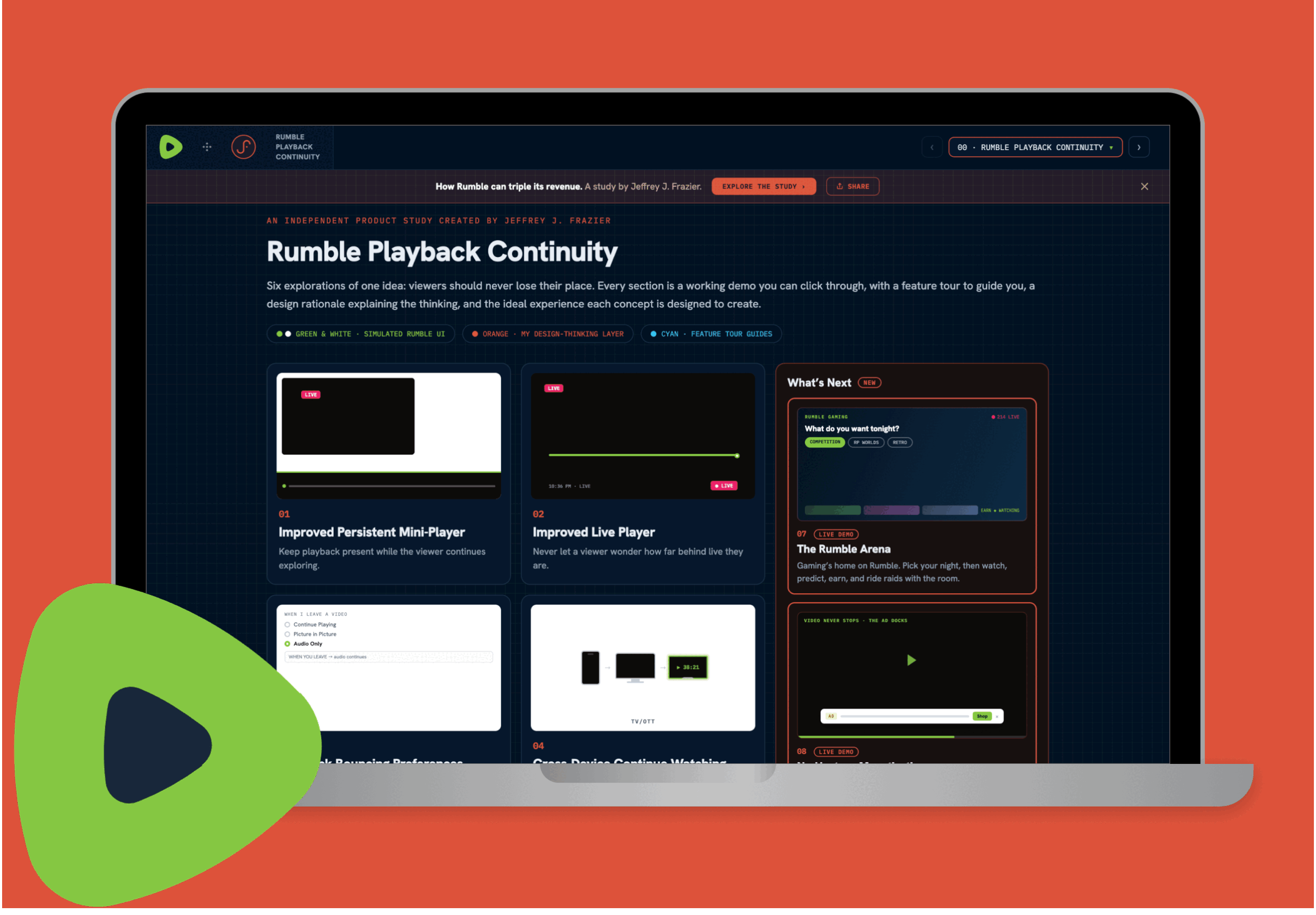

Rumble Playback Continuity
An independent UX Product Study by Jeffrey J. Frazier • 2026
Designing a more continuous viewing experience
Rumble already supports a broad ecosystem of live, long-form, short-form, and creator-driven content. This study explores one focused opportunity: making the viewing experience feel more continuous as users watch, browse, participate, multitask, and move between devices. Each transition creates an opportunity to either preserve the user's state for a better UX.
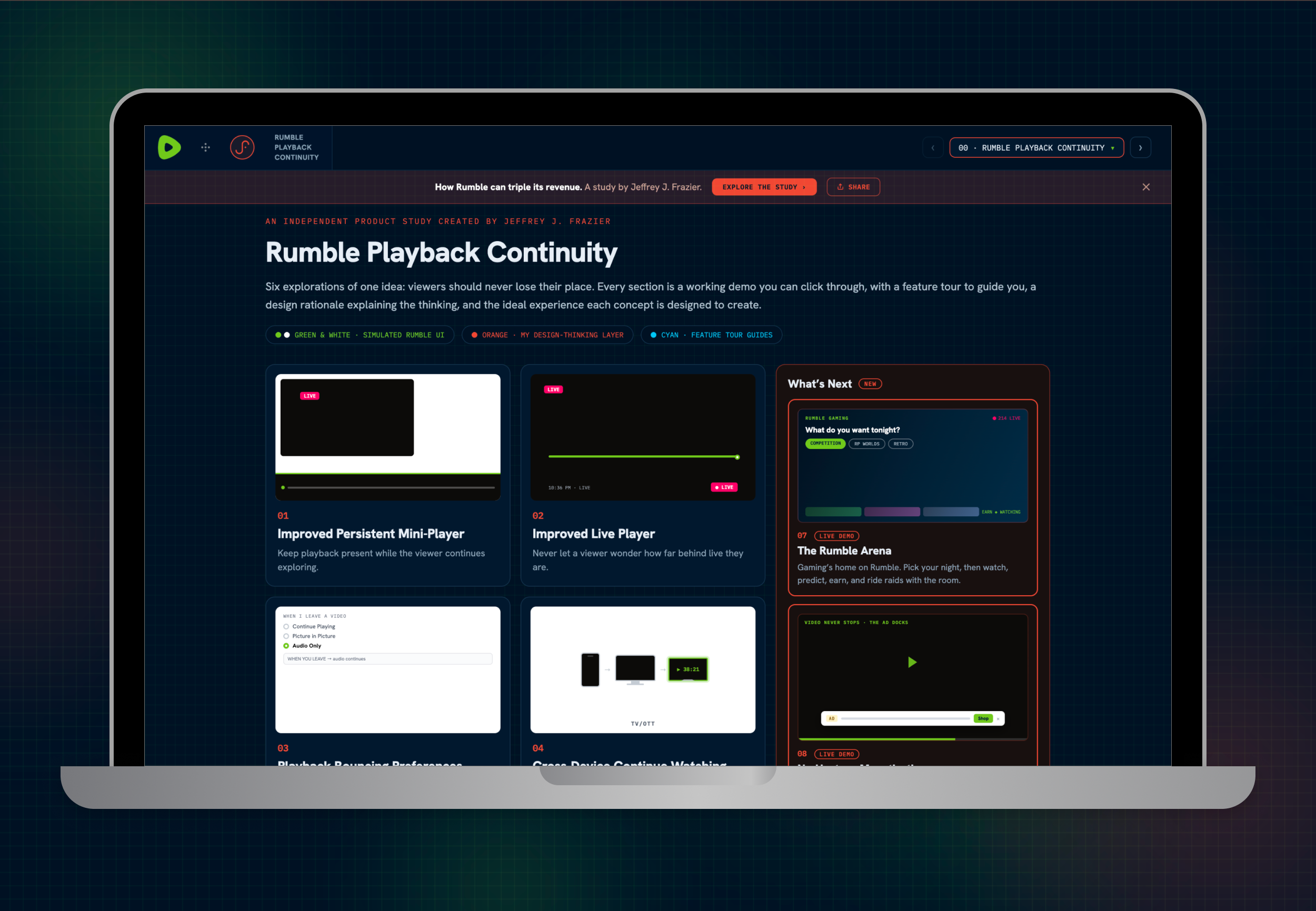
“Rumble Playback Continuity” explores five interconnected improvements:
1 - Persistent Mini-Player
Keep content playing while users continue exploring.
2 - Improved Live Player
Make playback position and live-state orientation immediately understandable.
3 - Playback Mode Controls
Give viewers clear control over how content behaves when context changes.
4 - Cross-Device Continue Watching
Preserve playback position as users move between devices.
5 - Protected Interactions
Prevent passive playback behavior from destroying unfinished user work.
Together, these concepts form one interaction model built around continuity, orientation, control, and state preservation. The goal is evolutionary rather than disruptive: preserve Rumble's identity while making the experience around it’s content more predictable.
01 - Persistent Mini-Player
Keep watching while continuing to explore.
└ Overview
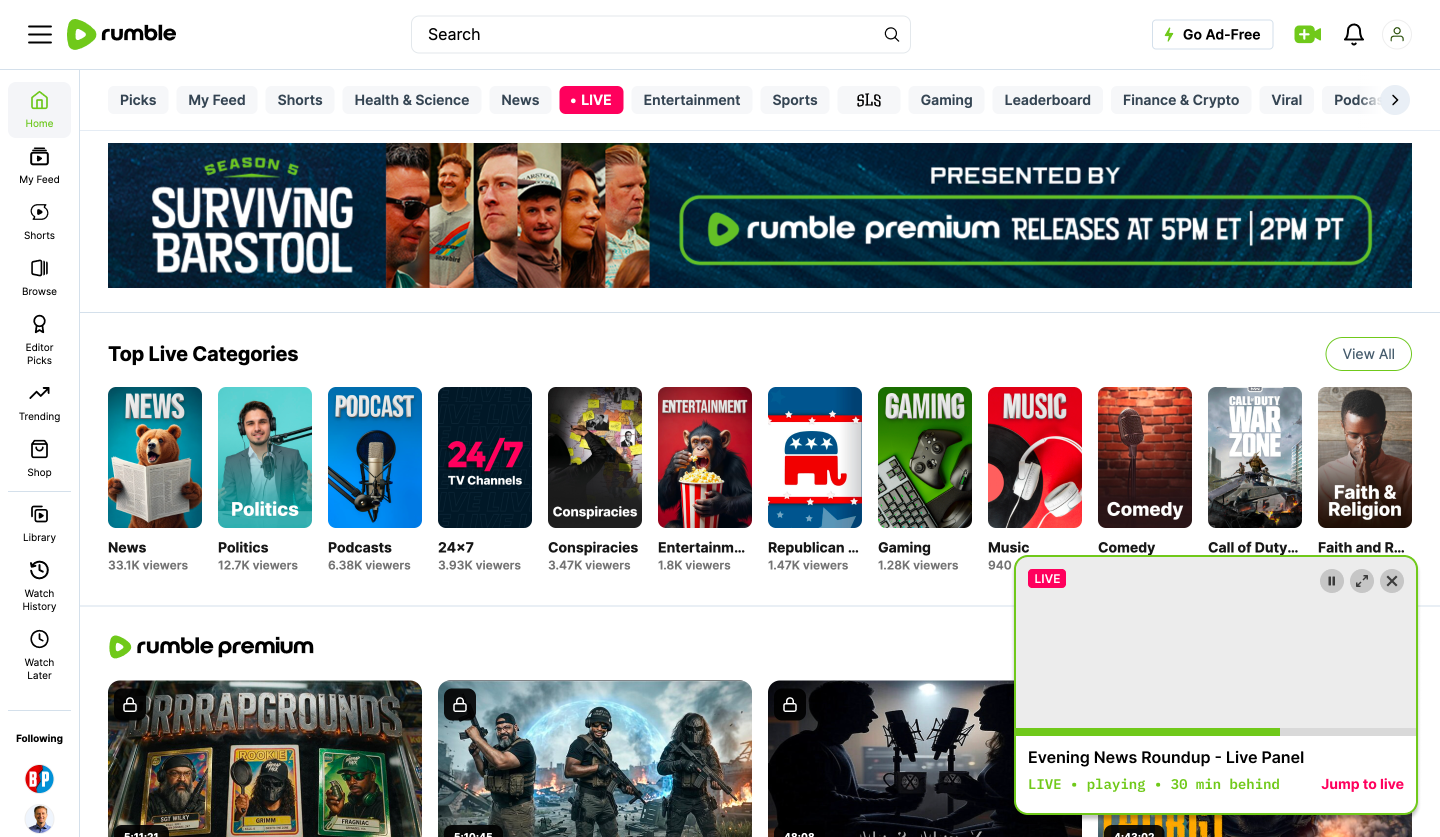
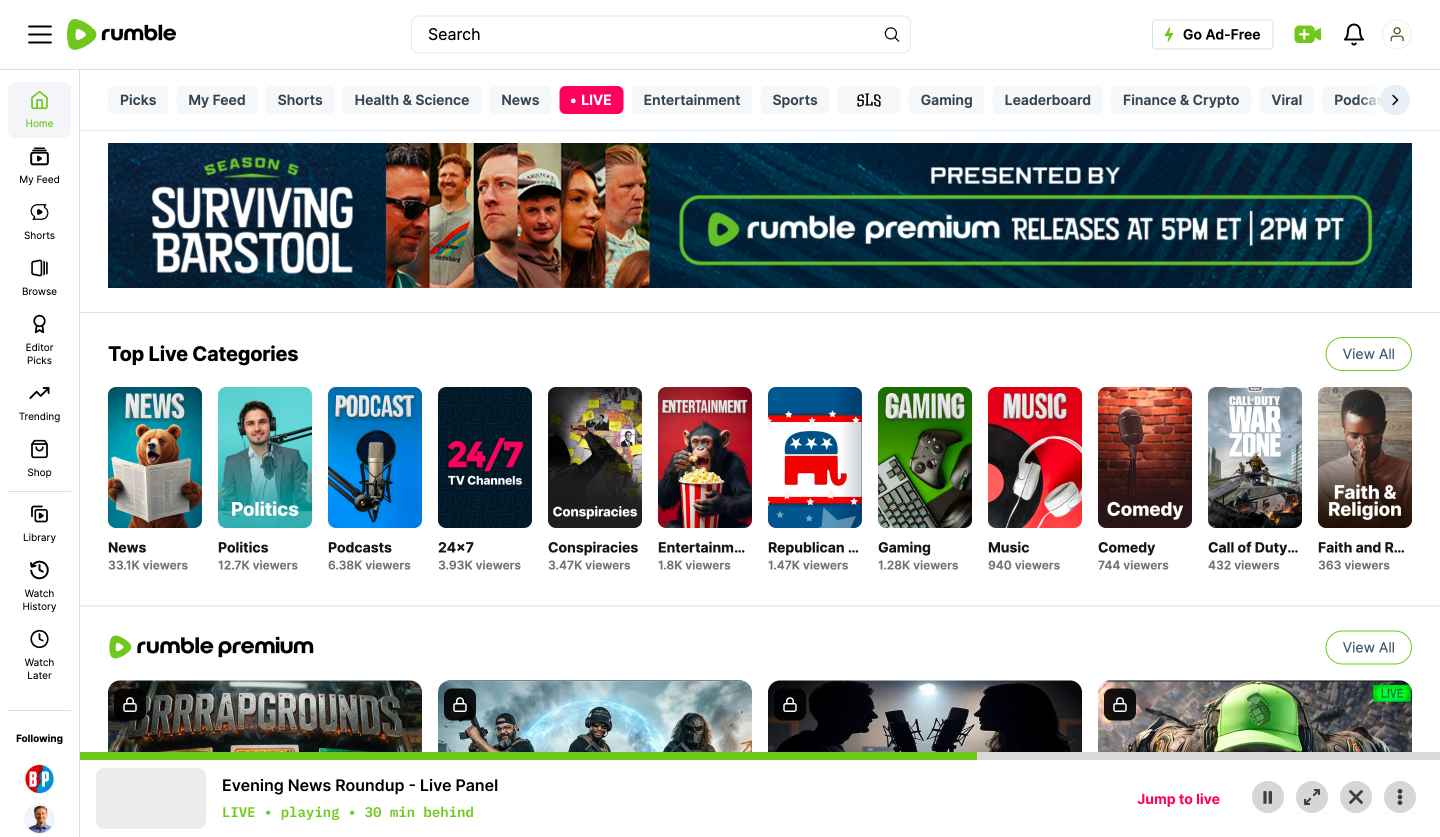
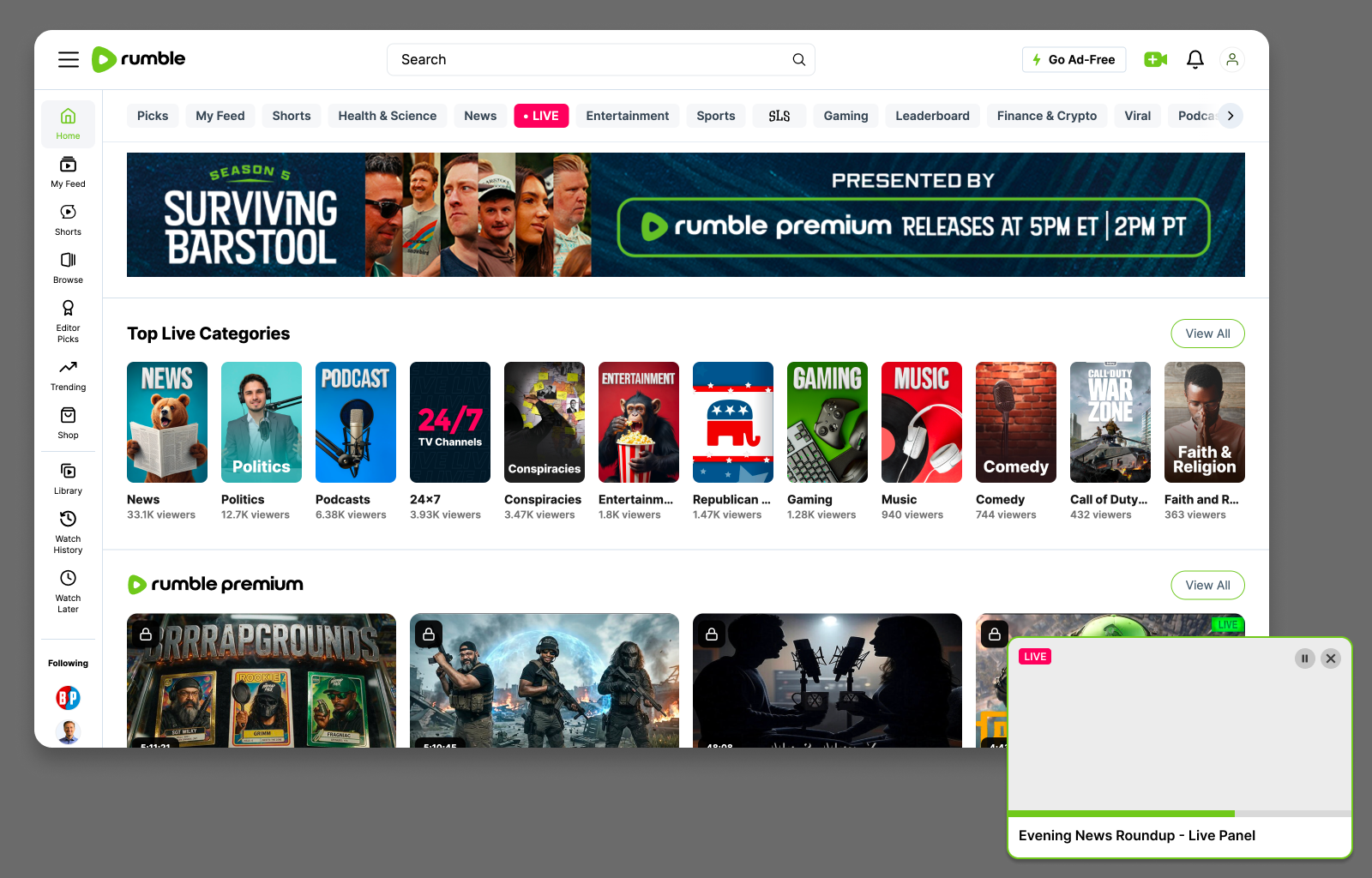
A viewer should not have to choose between watching and exploring. When a user leaves the full player to browse Home, search, visit a creator, or check notifications, the active session can persist in a compact mini-player.
This changes the interaction from: Watch → Leave → Re-find → Return to: Watch → Explore + Continue watching
└ Workflow Example
A viewer is watching a 90-minute live podcast and wants to look up another creator mentioned during the discussion. Instead of terminating playback, Rumble minimizes the active stream while the viewer searches, browses, and explores. Selecting the mini-player instantly restores the full viewing experience at the same position.
└ User Pain Point
Public Rumble discussions have specifically described friction when users want to multitask or navigate without interrupting playback. One user summarized the expectation simply:
“You cannot scroll or look around the app without ending the current video.”
That comment appeared alongside concerns around background playback and playback settings. Another user described wanting to continue listening while leaving the application for another task, while an earlier Android discussion similarly characterized background playback as essential when multitasking. These reports span different product versions, so I treat them as signals of a recurring user expectation rather than evidence that every behavior remains unchanged in the current build.
└ UX Principle
Preserve user context whenever possible.
Live playback should always help answer two questions: Where am I? Where is live? For live media, time is not one-dimensional. The interface should distinguish the viewer's playback position from the real-world broadcast position.
└ Why It Matters
Faster timeline orientation
Fewer accidental jumps to live
Easier recovery after scrubbing
Greater confidence during long live streams
Clearer transitions between delayed and live playback
How I Would Measure It: Time to relocate a known moment · Accidental Jump-to-Live events · Successful playback-position recovery · Return-to-live success
└ Product Hypothesis
If Rumble makes the relationship between playback position and live position immediately understandable, viewers can navigate long live streams with greater confidence.
02 - Improved Live Player
Give viewers stronger orientation inside live content.
└ Overview
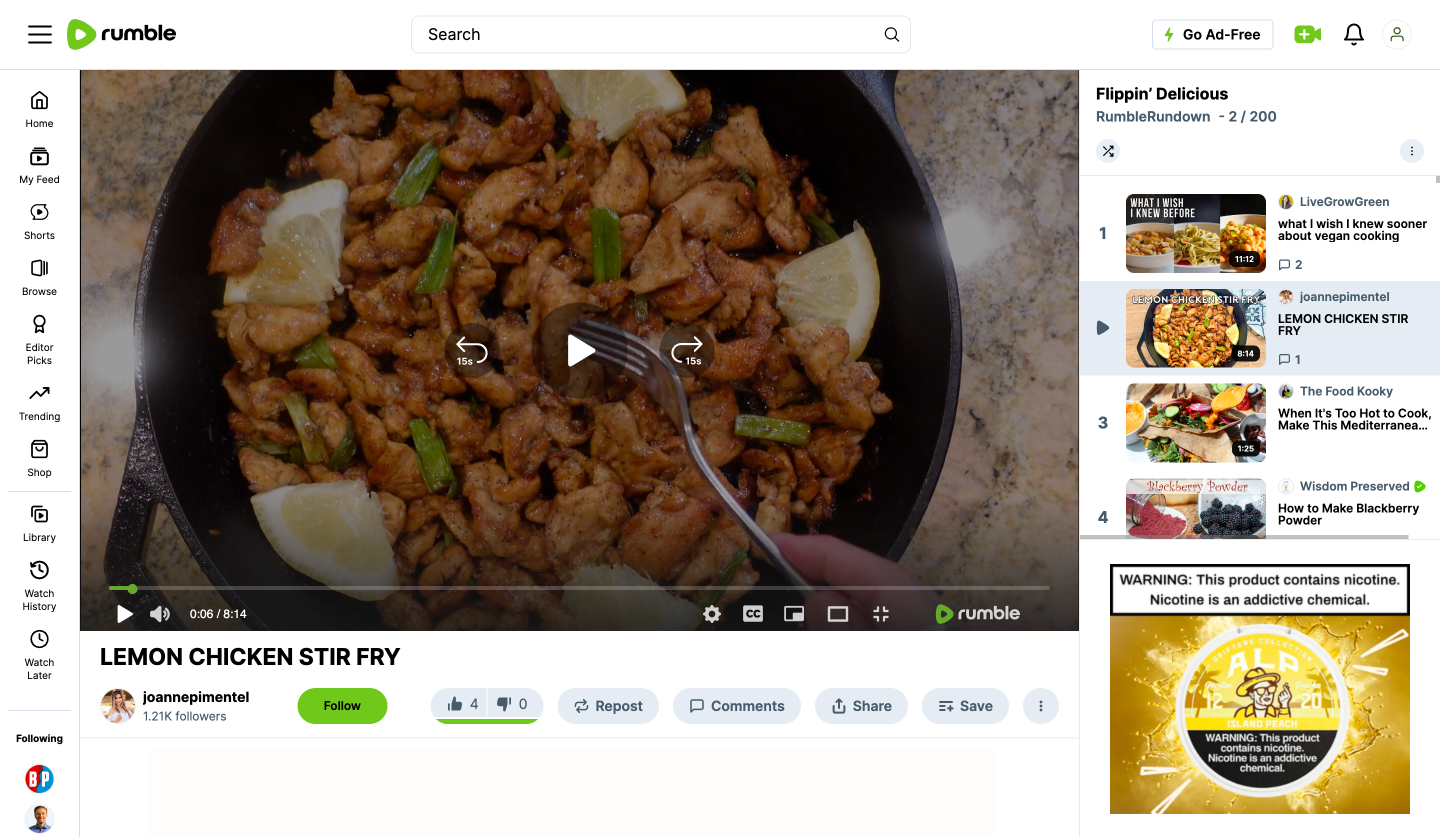
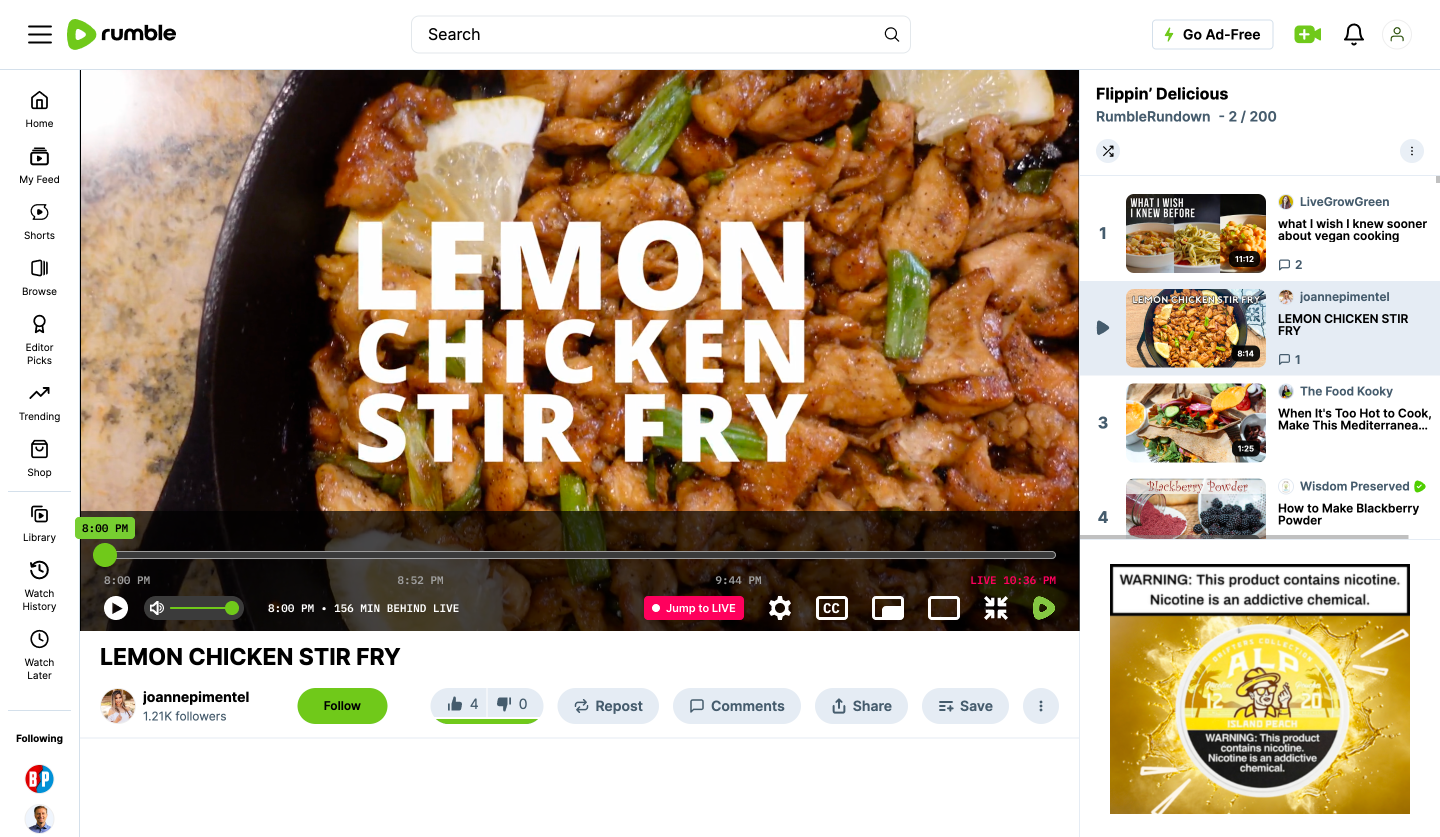
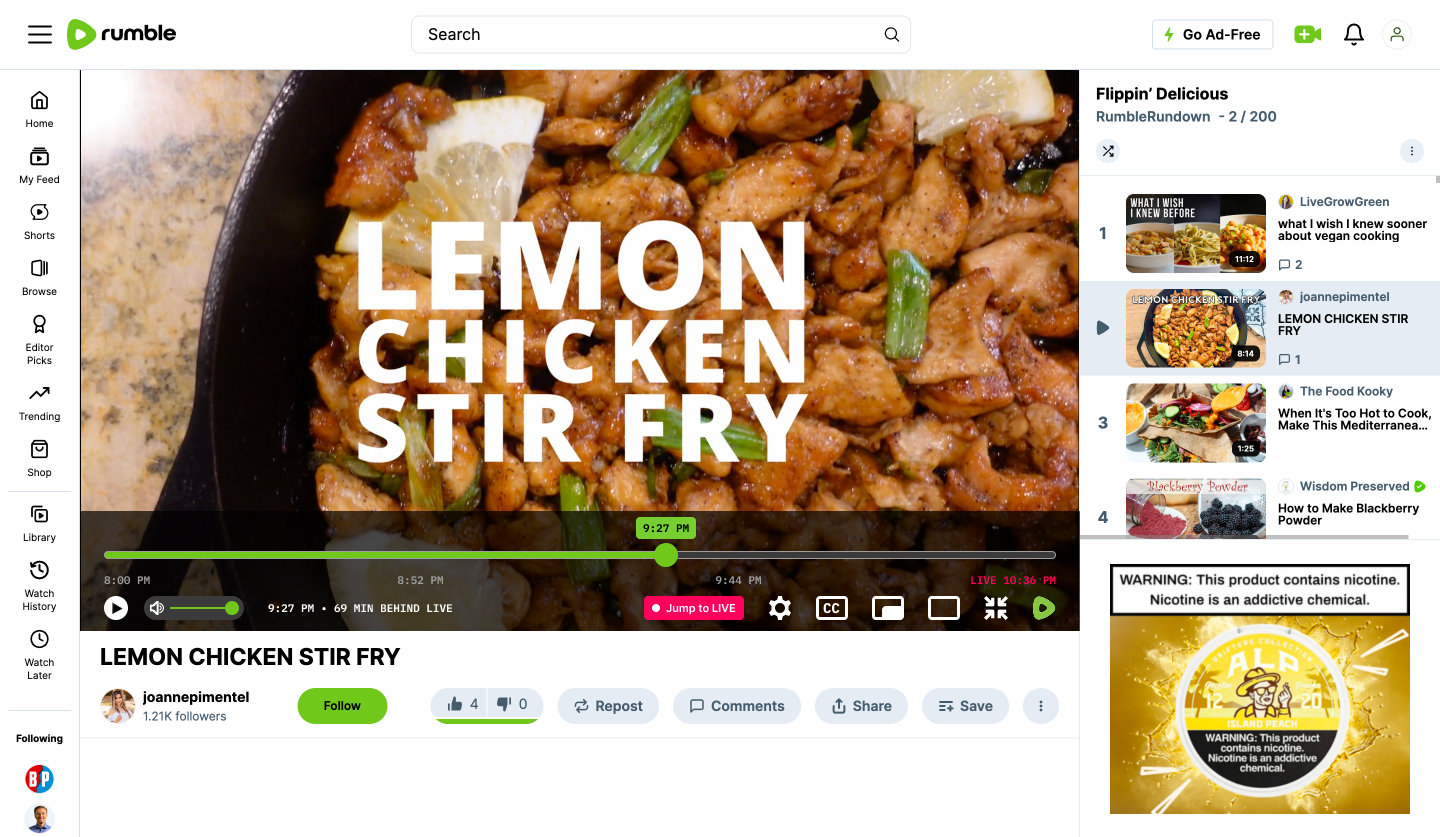
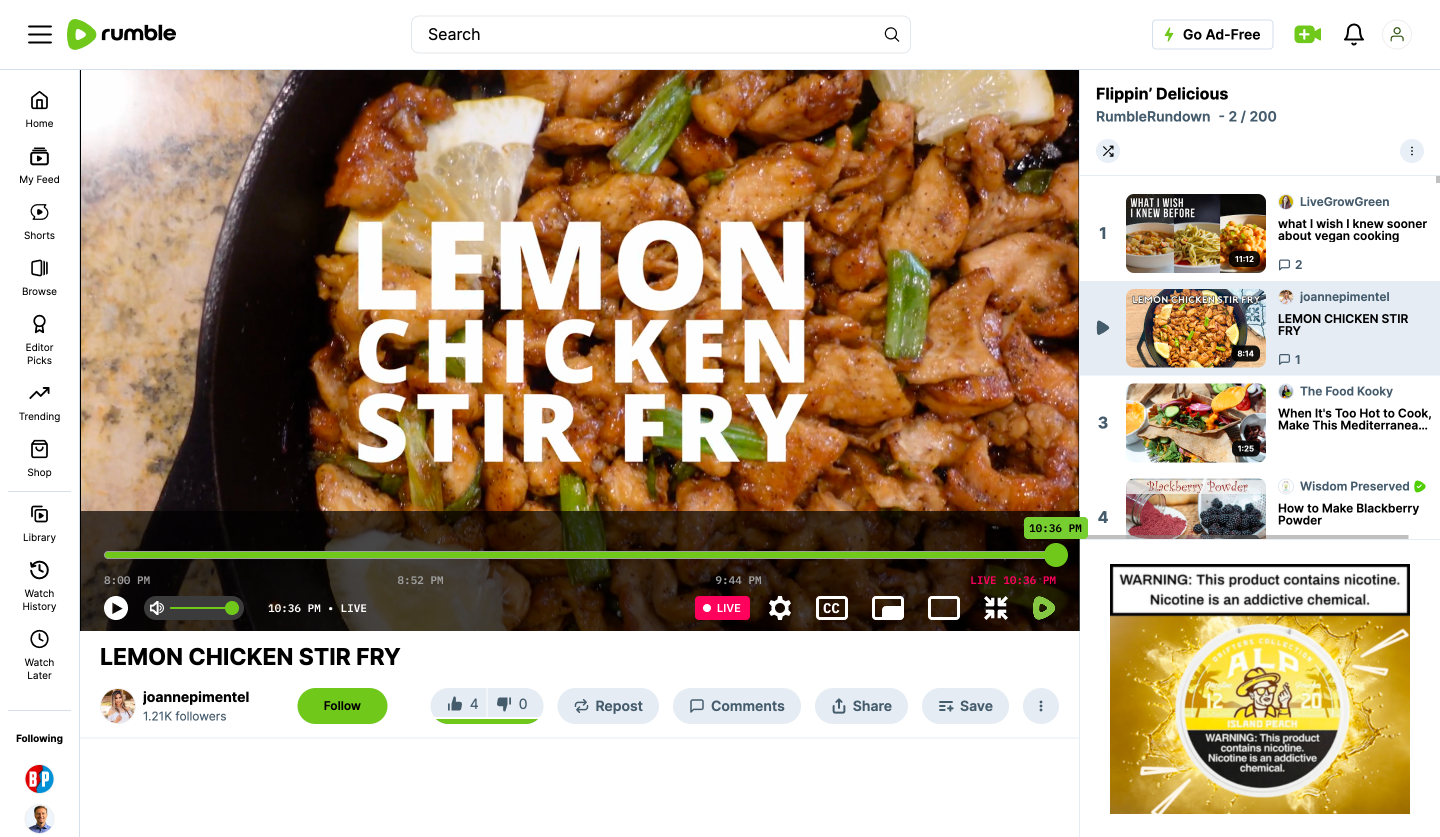
Live video creates a different interaction problem than traditional on-demand content. A viewer can occupy two positions at once: Where I am watching and Where the live broadcast actually is. When someone pauses, rewinds, or returns to a live stream, elapsed duration alone can make that relationship difficult to understand.
A clearer live timeline can communicate:
Current playback time · Time behind live · Current broadcast time · Jump to Live
For example:
9:58 PM · 38 min behind LIVE · LIVE 10:36 PM · Jump to Live
└ Workflow Example
A viewer joins a live show at 8:00 PM, pauses at 8:35 PM, and returns later. Instead of only showing elapsed playback, the player communicates both the viewer’s current position and the actual live broadcast position. The viewer can immediately understand where they are, how far behind live they are, and how to return.
└ User Pain Point
Public user feedback around Rumble’s live experience has specifically called out difficulty understanding the current time when pausing or scrubbing through a live stream. The opportunity is not necessarily adding more playback capability. It is creating stronger orientation within an existing live experience.
└ UX Principle
Make system state visible. For live media, time is not one-dimensional. The interface should clearly distinguish the viewer’s playback position from the real-world broadcast position.
└ Why It Matters
A clearer live timeline could improve:
Faster timeline orientation
Fewer accidental jumps to live
Easier recovery after scrubbing
Greater confidence during long live streams
Clearer transitions between delayed and live playback
How I Would Measure It: Time to relocate a known moment · Accidental Jump-to-Live events · Successful playback-position recovery · Return-to-live success
└ Product Hypothesis
If Rumble makes the relationship between playback position and live position immediately understandable, viewers can navigate long live streams with greater confidence.
03 - Explicit Playback Mode Controls
Make playback behavior understandable before users have to troubleshoot it.
└ Overview
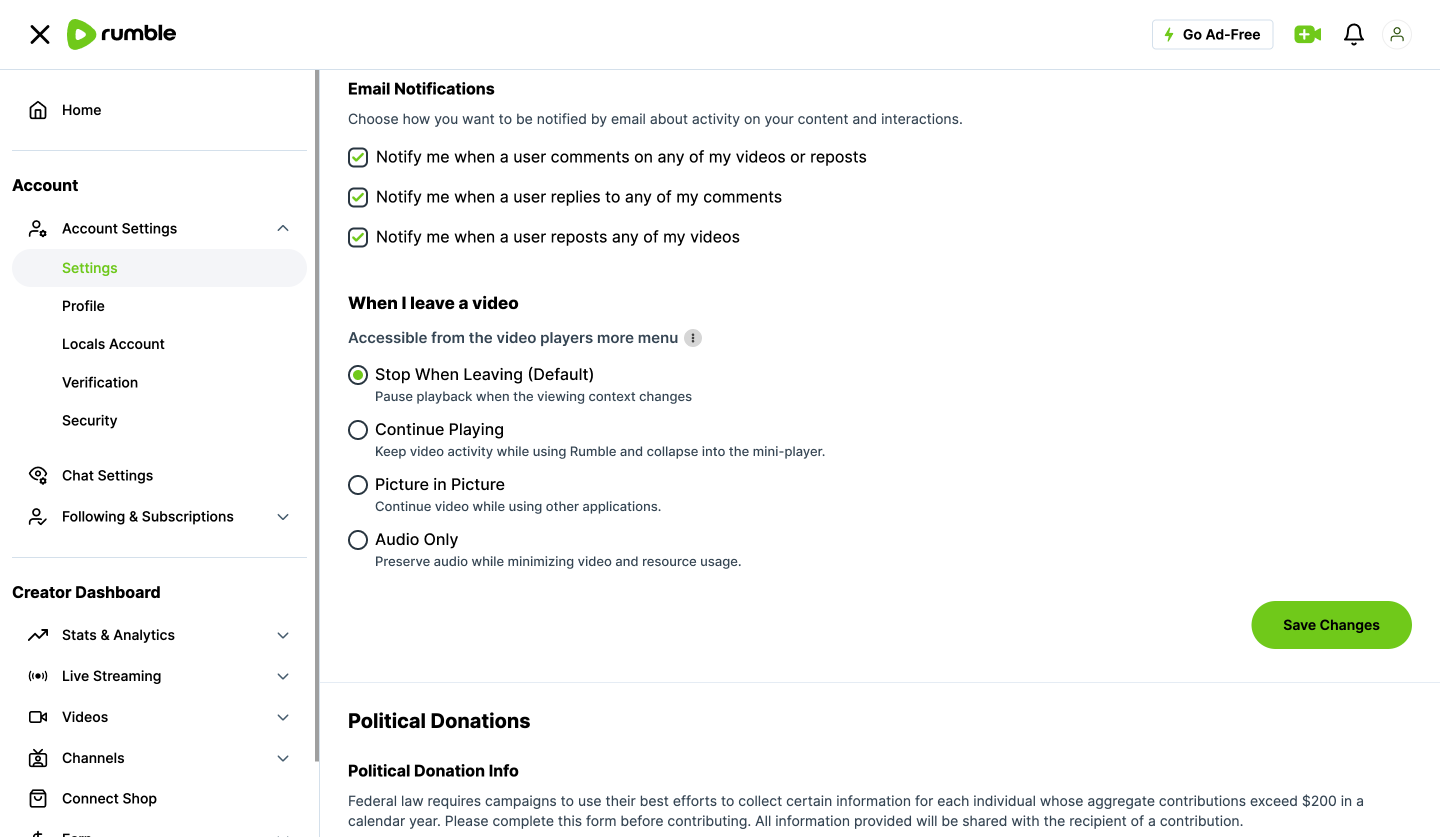
Media applications increasingly operate across different viewing contexts. Sometimes users are actively watching. Sometimes they are listening, multitasking, or intentionally leaving the experience. The opportunity is not simply to add another playback setting. It is to organize playback around user intent and make the resulting behavior predictable.
Instead of asking: “Which technical setting do I need?” the experience should answer: “What do I want Rumble to do when I leave this screen?”
└ Proposed Control Model
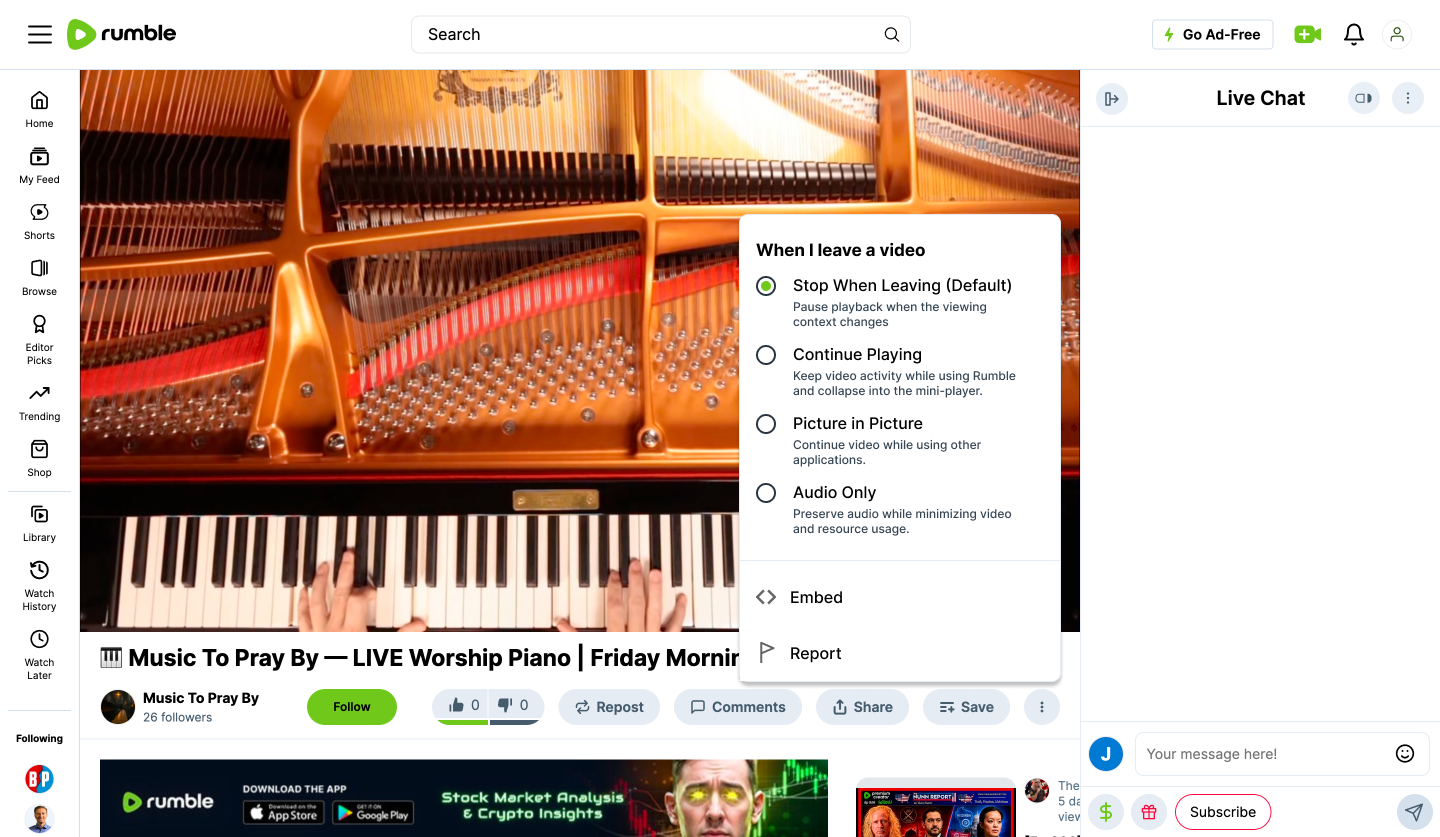
Stop When Leaving - Pause playback when the viewing context changes.
Continue Playing - Keep audio and video active while the user continues exploring Rumble.
Picture in Picture - Continue video in a persistent player while using other applications.
Audio Only - Preserve audio while minimizing video and unnecessary resource use.
Secondary preferences such as Autoplay Next Video can remain independently configurable. Once selected, the user's preferred playback behavior should persist until they intentionally change it.
└ Workflow Example
A viewer regularly listens to a two-hour podcast while working. They select Audio Only once, and Rumble preserves that preference as part of their playback experience. They can lock their phone, move between tasks, or return later without repeatedly reconfiguring the player.
Another viewer prefers visual multitasking and selects Picture in Picture. The system adapts to user intent rather than assuming every viewer wants the same behavior.
└ User Pain Point
Public Rumble feedback has surfaced confusion around background playback and finding the appropriate settings for different viewing situations.
Rumble already provides playback controls, including Autoplay preferences documented in its support materials. The opportunity is therefore less about feature absence and more about discoverability, consistency, and a clearer mental model for playback behavior.
└ UX Principle
Give users control—and make that control visible. Settings should reflect what the viewer is trying to accomplish rather than requiring them to understand how separate technical behaviors work together.
The goal is simple: Choose the intended behavior once. Make the resulting experience predictable everywhere it applies.
└ Why It Matters
Better playback-setting discoverability
Fewer unexpected playback behaviors
Less repetitive configuration
Greater user confidence
More predictable cross-platform behavior
Better support for long-form and podcast-style consumption
How I Would Measure It: Playback-setting discovery · Preference retention · Playback-related setting changes · Unexpected playback exits · Playback-related support friction
└ Product Hypothesis
If playback controls are organized around user intent rather than isolated technical behaviors, viewers can spend less effort managing the player and more time consuming content.
04 — Cross-Device Continue Watching
The content should remember where the viewer stopped, even when the device changes.
└ Overview
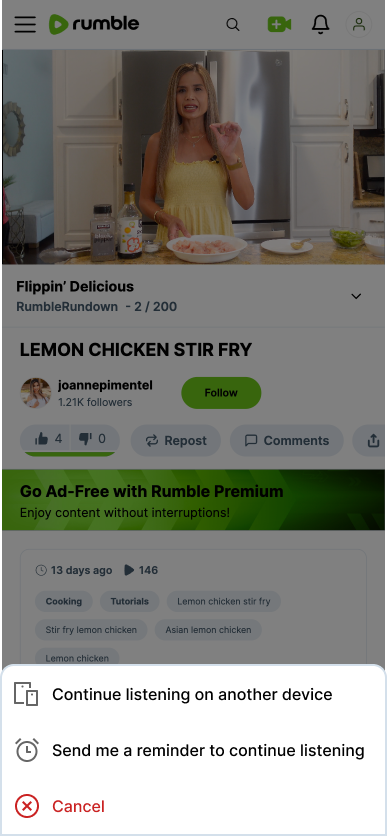
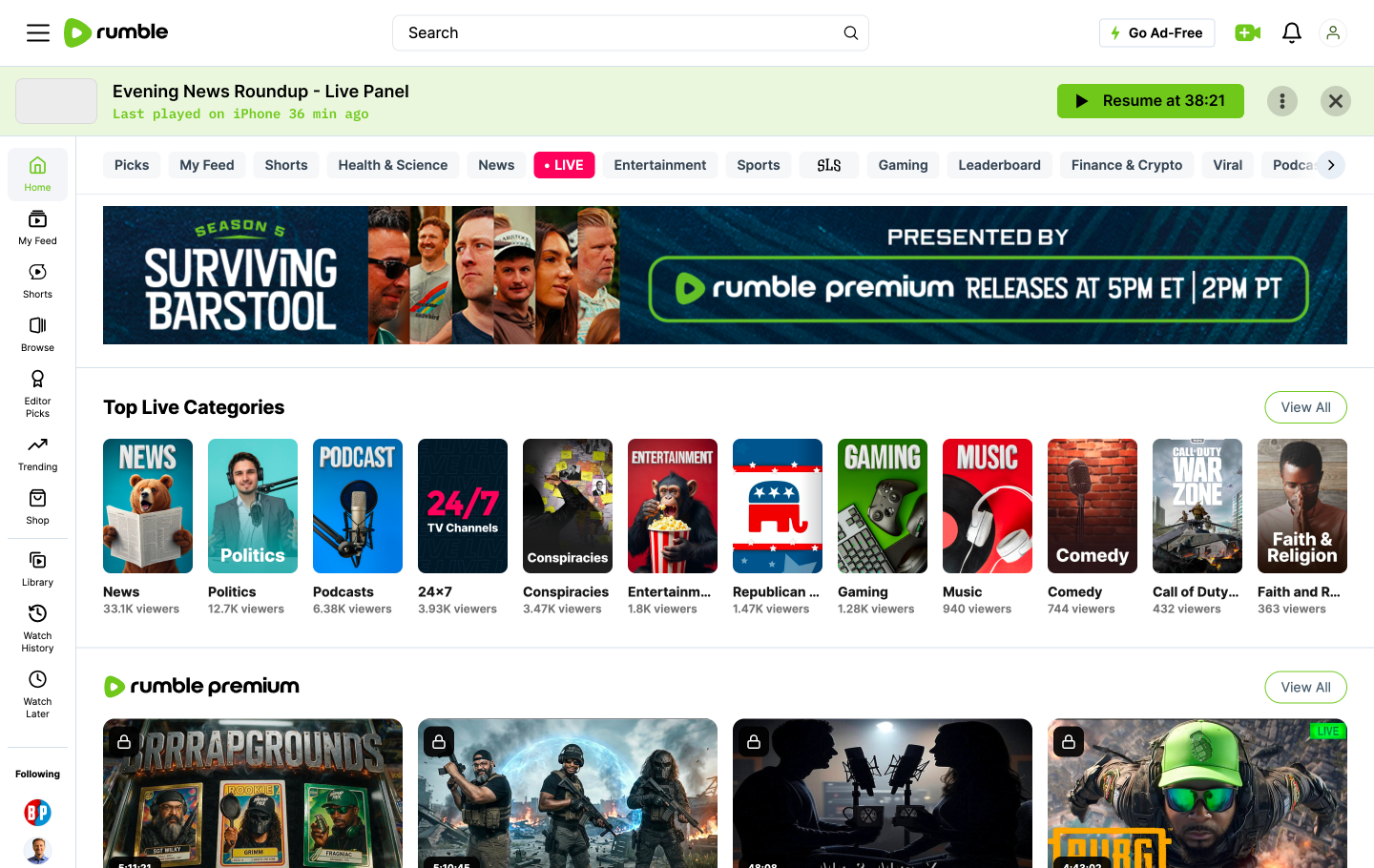
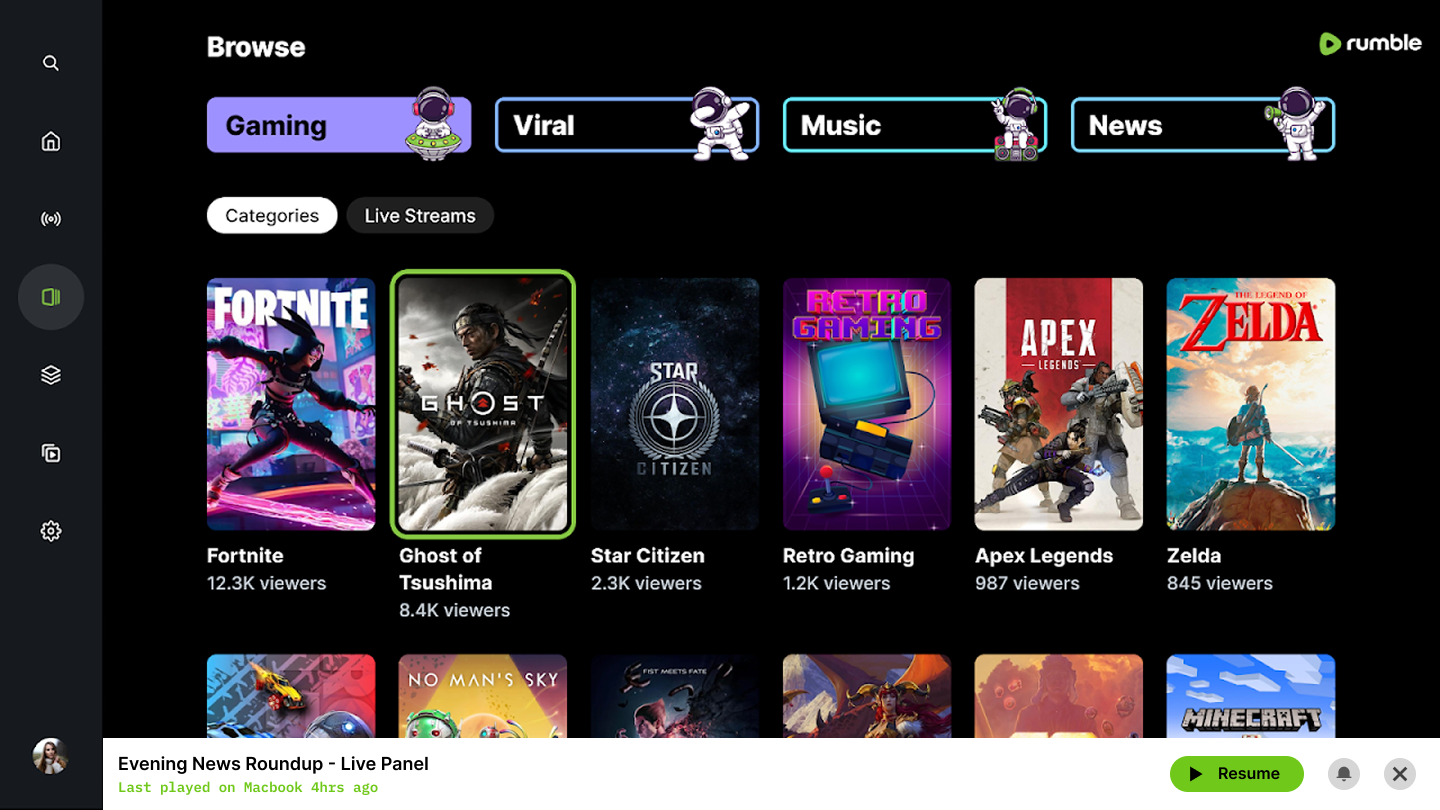
Rumble spans mobile, web, and connected-TV experiences. That makes continuity a system-level interaction, not a single-screen feature. A viewer should be able to leave one device and return on another without remembering timestamps, searching for the same video, or manually scrubbing back to their position. Continue Watching can act as a reliable cross-device handoff by preserving one authoritative playback position wherever the viewer returns.
└ Proposed Experience
A Continue Watching module could display:
The Podcast — Live Replay
38:21 watched · 1:16:04 remainingContinue from 9:58 PM →
Supporting context can optionally show:
Last watched on iPhone · 4 min ago
The emphasis should remain on the action the user wants to take: Continue watching.
└ Workflow Example
Morning - Phone
A viewer watches 38 minutes of a long-form show before leaving for work.
Afternoon - Desktop
They open Rumble and resume from the same position without searching or scrubbing.
Evening - TV/OTT
They continue again from the latest meaningful playback point.
One session. Three devices. No timestamp memory. No manual recovery.
└ User Pain Point
Long-form and live content often extends beyond a single session or device. When playback state is not clearly preserved, users must remember where they stopped, locate the content again, and manually recover their position. That friction becomes more noticeable as content length increases and viewing moves between mobile, desktop, and television experiences.
└ UX Principle
Don't make users remember information the system can remember for them. The burden of continuity should belong to the product, not the viewer. Playback position, content identity, and recent viewing state should persist wherever the same authenticated user continues the experience.
└ Why It Matters
Higher resume-session rates
Less searching and manual scrubbing
More completed long-form viewing
Stronger cross-device engagement
Faster recovery after interrupted sessions
A more connected experience across Rumble platforms
How I Would Measure It: Cross-device resume rate · Resume-to-playback conversion · Time to resume · Long-form completion · Manual seek behavior after resume
└ Product Hypothesis
If Rumble reliably preserves viewing state across devices, viewers can treat the platform as one connected experience rather than a collection of separate applications.
05 — Protect Unfinished Interactions
Playback automation should never destroy intentional user work.
└ Overview
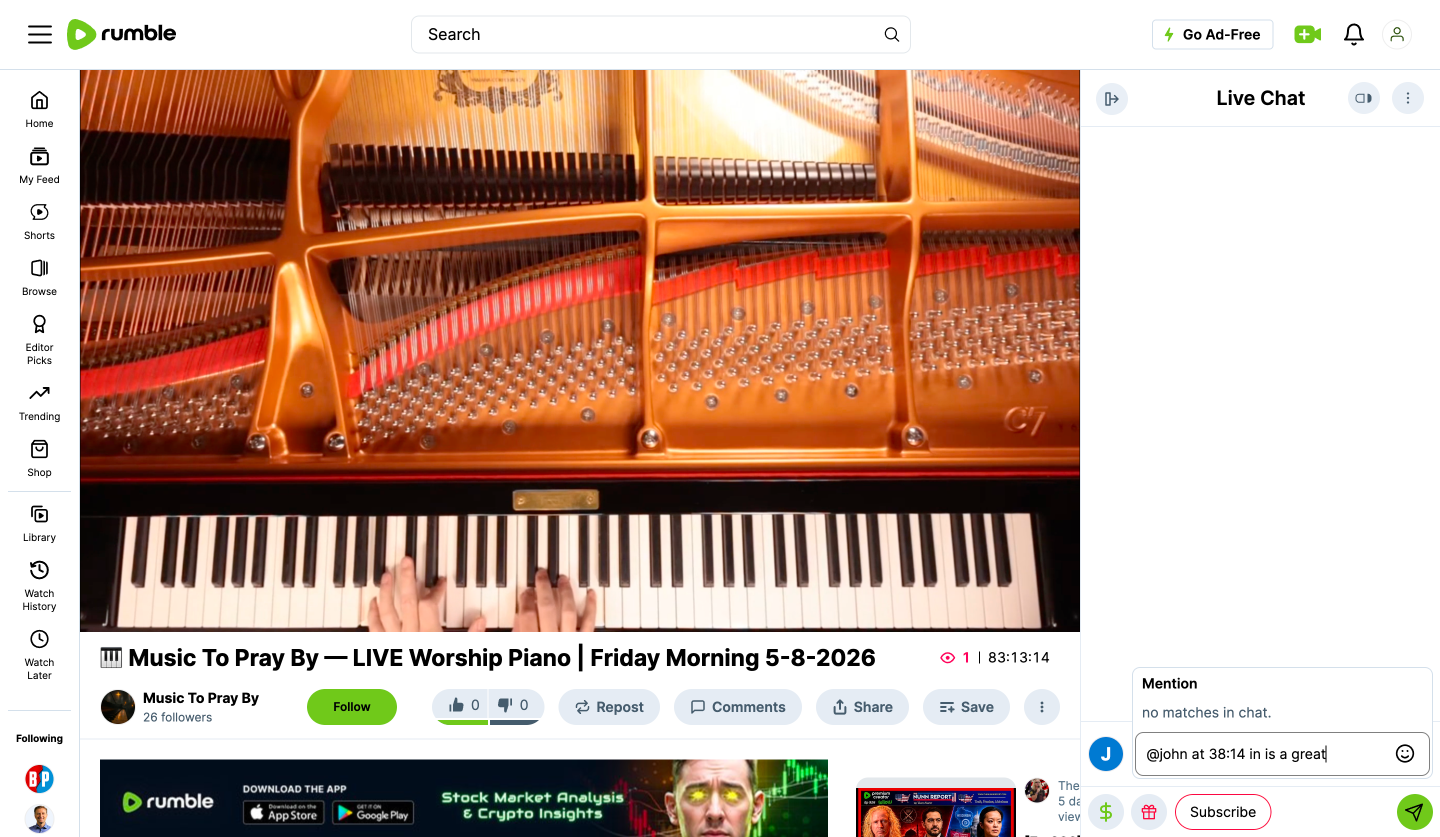
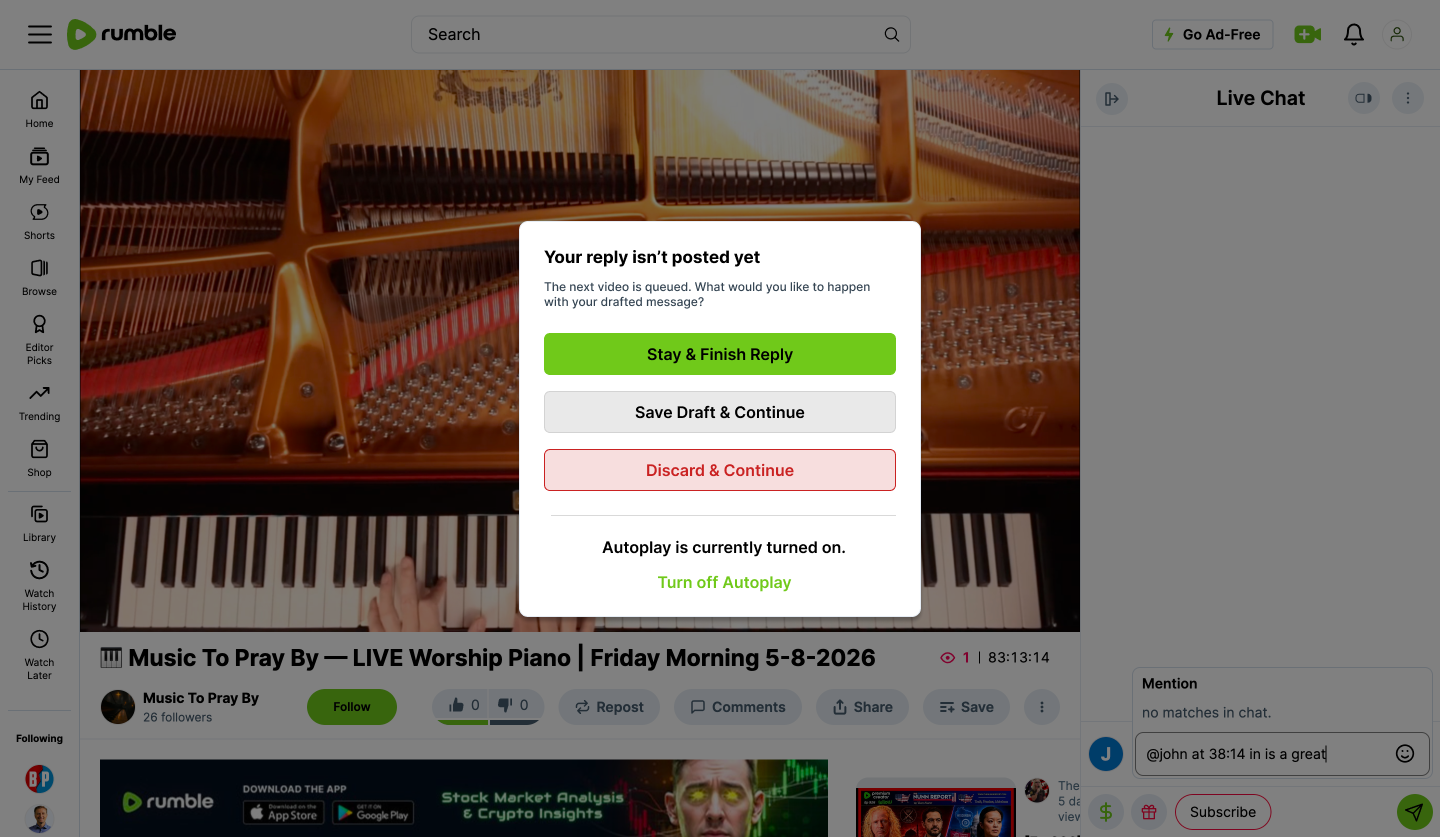
Playback automation should never destroy intentional user work. Autoplay and automatic transitions can improve flow—until passive system behavior interrupts something the user is actively doing. If a viewer is writing a comment, searching, completing a form, or composing live chat, Rumble should recognize that unfinished interaction before changing state.
└ Proposed Experience
Before autoplay advances, Rumble detects active user input and protects it. For example:
Dialog title:
Your reply isn't posted yet.
CTAs:
Stay & Finish Reply
Save Draft & Play Next
Discard & Continue
Once the interaction is resolved, normal playback behavior can continue. This same protection model can apply to: Comment drafts · Search input · Forms · Creator actions · Live-chat composition · Other temporary user states. Or, even more simply, autoplay temporarily pauses until the comment is submitted or dismissed. Once the user completes the interaction, normal playback behavior can resume.
└ Workflow Example
A viewer begins writing a reply near the end of a video. The video reaches completion and autoplay is ready to advance. Instead of replacing the current state, Rumble recognizes the unfinished reply and gives the viewer a clear choice. The user can finish the interaction, save it for later, or intentionally discard it before continuing.
└ User Pain Point
Public Rumble feedback has described situations where autoplay or navigation interrupts an unfinished comment. The broader problem is not autoplay itself. It is system-triggered behavior taking priority over explicit user intent. Any interaction that contains unsaved input or active work should be treated as a meaningful state worth protecting.
└ UX Principle
User intent takes priority over passive automation. A system-triggered transition should rarely destroy user-generated work without warning. When active input exists, the experience should preserve that state, delay the transition, or clearly ask the user how to proceed.
└ Why It Matters
Fewer abandoned comments
Higher interaction completion
Less frustration around autoplay
Better protection against accidental data loss
Greater confidence during participation
A reusable state-protection pattern across Rumble
How I Would Measure It: Comment-start to submit conversion · Draft recovery · Autoplay cancellation during active interaction · Abandonment near video completion · Interrupted-input recovery
└ Product Hypothesis
If Rumble protects intentional user activity from passive system behavior, users can participate more confidently without having to anticipate what the interface might do next.
Conclusion of Rumble Playback Continuity
Continuity should reduce the amount of effort required to stay engaged with content.
Rumble Playback Continuity is a system for maintaining context as viewers watch, explore, participate, multitask, and move between devices. Across the five concepts, the same principle is to preserve meaningful user state whenever the product can do so reliably. That means keeping playback active while users explore, making live position easier to understand, clarifying playback behavior, preserving progress across devices, and protecting unfinished interactions from passive automation.
The goal is not to make Rumble behave like another video platform. It is to identify interaction patterns that can make the existing experience feel more predictable, connected, and reliable while preserving Rumble’s product identity.
Viewing
Watch duration
Playback abandonment
Resume-session rate
Long-form completion
Discovery
Browsing during active playback
Mini-player return rate
Content discovery while viewing
Cross-Platform
Cross-device continuation
Resume success
Time to resume
Participation
Comment completion
Draft abandonment
Interaction recovery
Live-engagement continuity
Usability
Playback-setting discovery
Timeline recovery
Accidental interruption rate
User confidence
Together, these signals would help determine whether stronger continuity translates into both better user experience and stronger product engagement.

Project Scope
This study was developed independently using publicly available product behavior, user feedback, and observation with no access to Rumble’s internal research, analytics, roadmap, technical architecture, monetization strategy, or platform constraints. Any proposed direction would require validation through behavioral data, user research, engineering feasibility, platform requirements, and business priorities.
Related Product Study
BoundWrite AI
jeffreyjfrazier.com/boundwrite
Designing trustworthy AI into complex enterprise workflows. AI Product Design · Workflow Automation · Human-AI UX · Explainability · Design Systems
An end-to-end AI product study exploring automated intake, intelligent pre-fill, confidence scoring, source transparency, human-in-the-loop review, and explainable decision support.